API Keys
Create and manage API keys so other systems can talk to Building Swell.
Last updated 25 days ago
Introduction
API keys let another system talk to Building Swell on your behalf. If you're wiring up a script, a reporting tool, or an internal integration, this is where the credentials come from.
Each key carries its own set of permissions, so a key only reaches what you allow it to reach.
Not seeing this page? Reach out to your company admin to update your permissions. See the Roles guide.
Step-by-Step Guide
Create a Key
Go to Settings → API Keys.
Click Create API Key.
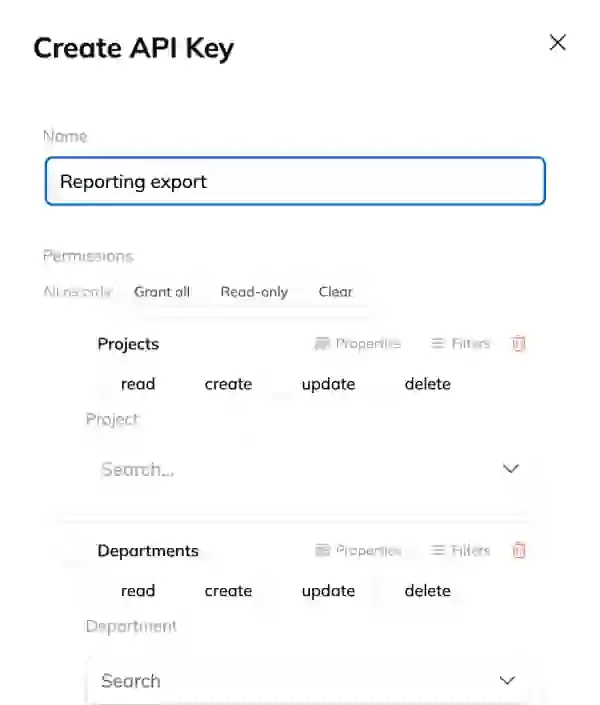
Give it a Name. Name it after the thing that will use it, not the person creating it. "Payroll export" beats "Jordan's key" when you're looking at the list a year from now.
Set the Permissions the key needs, and nothing more.
Save, then use Copy to clipboard to take the key.
Copy the key now
Copy the key and store it somewhere safe as soon as it's created. Treat it like a password.
Edit a Key
Click Edit on the key's row to change its name or its permissions. Editing permissions takes effect immediately, so anything using that key loses access to whatever you removed.
Delete a Key
Click Delete on the key's row. Anything using it stops working straight away, and the key can't be brought back. If you're rotating a key, create the replacement and move the integration over before you delete the old one.
Tips
One key per integration. Shared keys make it impossible to tell what broke when you revoke one.
Give the least access that works. A key that only reads timesheets can't damage your routes.
Rotate on staff changes. If someone who had a key leaves, replace it.
FAQ
Can I see a key again after creating it?
Copy it at creation time and store it safely. If you lose it, create a new key and delete the old one.
What happens to data created by a key?
It stays. Deleting a key stops future access, it doesn't undo past work. The System Log is where you go to see what ran.
Do keys expire?
A key stays valid until you delete it, so review the list periodically and remove what you no longer use.
Conclusion
Keep the list short, name keys after their job, and give each one only the access it needs.
Need help? Hit the chat button or click "Ask" in the app. You can also reach us at support@buildingswell.com.
Was this helpful?
Still need help? Ask the team