Materials and Parts
Build your item catalog, and read On hand, Reserved, Available and On order correctly.
Last updated 28 days ago
Introduction
Inventory is where Building Swell tracks the physical stuff: the material you buy and the parts you make or buy in. Materials and Parts are two tabs on the same catalog, and an item lives on one or the other depending on its Type.
The catalog is also where the stock figures live, and those figures are the part worth reading carefully. Most confusion about inventory is really confusion about the difference between On hand and Available.
Not seeing this page? Reach out to your company admin to update your permissions. See the Roles guide.
Step-by-Step Guide
Add a Material or a Part
Open Inventory and pick Materials or Parts.
Add an item and fill in the Name and its SKU.
Set the Type and a Category, and add a Description if it needs one.
Set the Base unit. This is the unit every quantity for this item is counted in, so settle it before anyone starts counting stock.
Enter the Unit cost (per base unit).
Optionally set a minimum and maximum quantity. Both have to be numbers.
Save it.
Parts also carry a lifecycle Status, and a new part starts as active. Materials do not use Status at all.
Base units come from your units list. See the units section of the Catalogs guide if you need to add one first.
Reading the Your Statuses
Four numbers sit against every item, and they answer different questions. Getting them mixed up is the usual reason two people disagree about whether there is enough material.
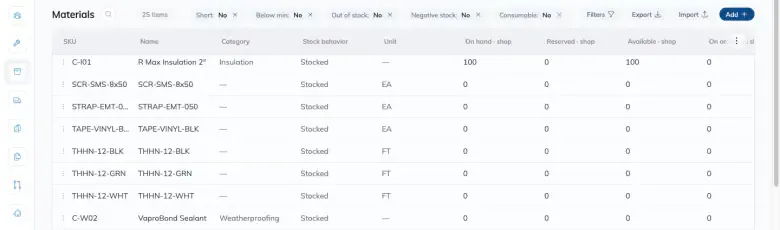
Every quantity is shown with its unit. If you are reading a number without a unit beside it, you are reading it wrong.
Short is worth reserving for one thing: Available below zero. It does not mean "we should order more", which is a separate question the Roll-up answers.
The Roll-up
The catalog tells you what you have, while the Roll-up tells you what the work scheduled is going to ask for.
It lists one row per material that appears on any order or project bill of materials, with Order demand and Project demand beside On hand and Available. Expand a row and you see which orders and projects are asking for it, each linking through to that bill of materials, so a shortage traces back to the jobs causing it.
Two different questions answered:
Available answers "can I commit this material right now", and it is On hand minus what is reserved. A red Available means you are short in that sense.
Comparing demand to On hand answers "will we have enough for the work that is booked". That is a forecast, not a reservation, and it is a different number.
Do not read one as the other. A material can look fine on Available and still be well short of what the booked work needs.
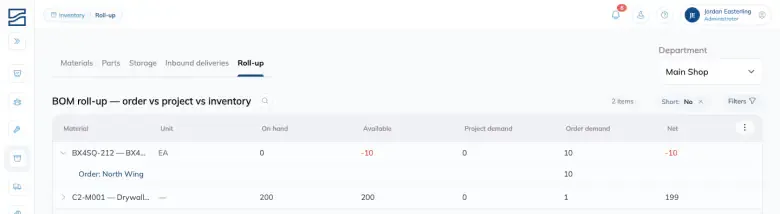
One thing to watch on this screen: On order is not part of the demand comparison. Material already on its way to you does not close the gap here. Check it against the inbound deliveries separately.
Reserved is not shown as its own column in the Roll-up. It is still in there, as the hidden part of the Available sum.
Counting Stock
Use Count stock on an item to correct what Building Swell thinks is on hand. Enter what you actually counted and the count becomes the new on hand figure, with the difference recorded so the change is traceable rather than silent.
Counting is the honest way to fix a number. Editing an item does not move stock.
Import and Export
Export downloads the catalog as it is currently filtered, so narrow the list first if you only want part of it. The button reads Exporting… while the file is built.
To load a lot of items at once, use Download a template to get the spreadsheet in the right shape, fill it in, and import it back.
Editing and Archiving
Edit changes an item’s details. Archive retires one you no longer stock: it drops out of pickers while staying on the history that already references it.
On the Parts tab you can also filter by whether a part is Purchased or Manufactured, which is the quickest way to separate what you buy from what you make.
Tips
Settle base units first. Changing the unit an item is counted in after people have counted stock in it is the one change that invalidates numbers rather than correcting them.
Fill in the SKU. It is the field people search and scan by.
Read Available, not On hand, when you are deciding whether you can commit material. On hand includes stock that is already promised to somebody.
Count rather than edit when the number is wrong. A count leaves a record of the correction.
FAQ
On hand looks right but Available is negative. Why?
More is reserved against projects and orders than you physically have. That is what short means. The stock is there, it is just already promised.
I filtered to a department and On order did not change.
That is deliberate. Its header says On order · all shops, because inbound deliveries arrive for the organization, not for one department.
What is the difference between a material and a part?
They are the same catalog split by Type, on two tabs. Parts additionally carry a lifecycle Status and can be filtered by Purchased or Manufactured.
Can I change an item’s base unit later?
Avoid it. Every quantity recorded against the item is in that unit, so changing it re-reads all of your existing numbers. Archive the item and add it again instead.
Conclusion
Get the catalog in with real SKUs and settled base units, then trust Available over On hand when you are deciding whether you can commit material. Correct numbers by counting, not by editing.
Need help? Hit the chat button or click "Ask" in the app. You can also reach us at support@buildingswell.com.
Was this helpful?
Still need help? Ask the team