Getting Started

Key Terminology

What stages, steps, routes, phases, orders, and projects each mean, and how they fit together.

Last updated 19 days ago

Introduction

Building Swell is built from a handful of pieces that stack together. Here is what each one means, and how they fit.


The terms

Term

What it means

Step

A required action inside a stage. Lining parts up, fastening them, checking measurements, labelling.

Stage

A checkpoint in your process. A physical station or a milestone, such as cutting, assembly, or a quality check before shipping.

Route

A sequence of stages: the full path a product follows from start to finish. A repeatable blueprint that keeps the process consistent and traceable.

Process Route

A process on its own, independent of any one department.

Department Route

That same process as a specific department runs it. It carries that department's shift, which is what drives Duration.

Phase

A series of routes showing where an order stands in its broader lifecycle. Design, Procurement, Prefab, Delivery.

Order

The items or assemblies to be fabricated for a project. One project can hold many orders.

Project

The full scope of work for a single client or job site.

Cycle Time

The work content of a stage or step, in hours. Shift-agnostic: four hours of labour is four hours whoever works it and whenever.

Duration

Cycle Time wrapped into the shift the work runs on, shown in weeks, days, hours, and minutes. The same Cycle Time produces a different Duration on a different shift.

Float

Duration minus Cycle Time. The calendar time the shift adds. It isn't slack you can spend.

Wait Step

A step with no labour, such as curing or drying. Set its People count to 0. Its Duration ignores the shift and tracks raw Cycle Time, weekends included.


How everything connects

Think of them as a nested hierarchy of workflow and execution:

  • Steps are the individual tasks within a Stage.

  • Stages are milestone-based groupings of Steps that form a Route.

  • Routes are sequences of Stages that complete a Phase.

  • Phases are collections of Routes that make up an Order.

  • Orders represent all items to be fabricated for a Project.

  • Projects are the full scope of work for a single job or client.

This structure lets you manage complexity while keeping consistency and traceability across your whole operation.


Where to go next

Stages, steps, and routes

Stages and Work Steps covers building the stations and the steps inside them.

The Steps table for a stage, listing each step in order with the number of people and the time it needs, plus Edit and delete actions.

Adding a New Route walks through creating a route and laying out its stages. Managing Routes covers editing, duplicating, and archiving, and the difference between Process and Department Routes in practice.
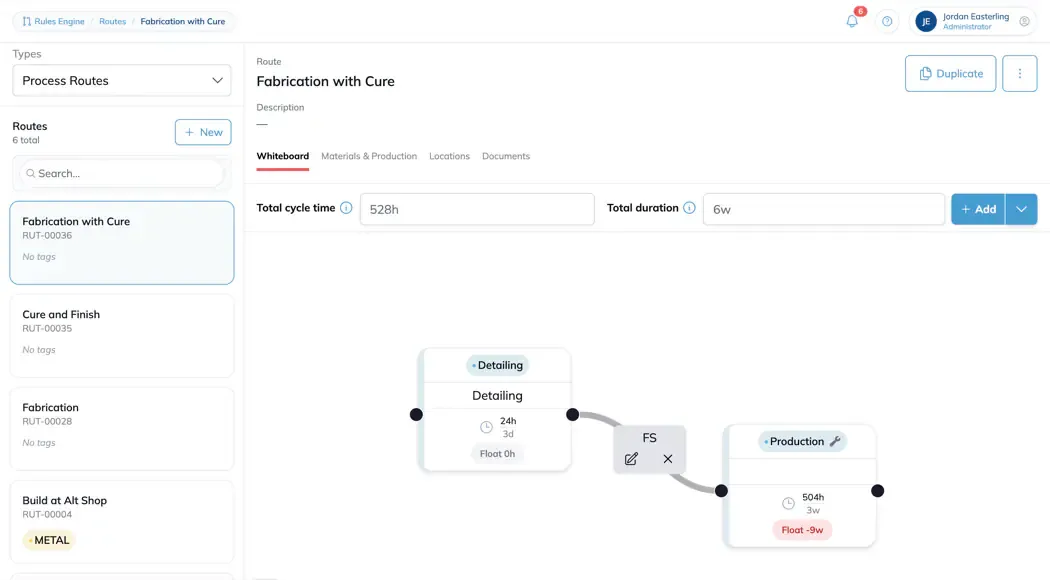
The route builder, with the list of routes on the left and the selected route drawn as connected stages, each showing its cycle time, duration and float above the route's totals.

Timing

Cycle Time, Duration, and Float goes through how the three relate.

Orders, projects, and phases

Intro to Orders shows you around the Orders page. Projects covers adding and managing them. Phases covers setting up the phase templates your orders are built from.