Phases
Set up the phase templates your orders are built from, and mark which ones can ride on a delivery.
Last updated About 2 months ago
Introduction
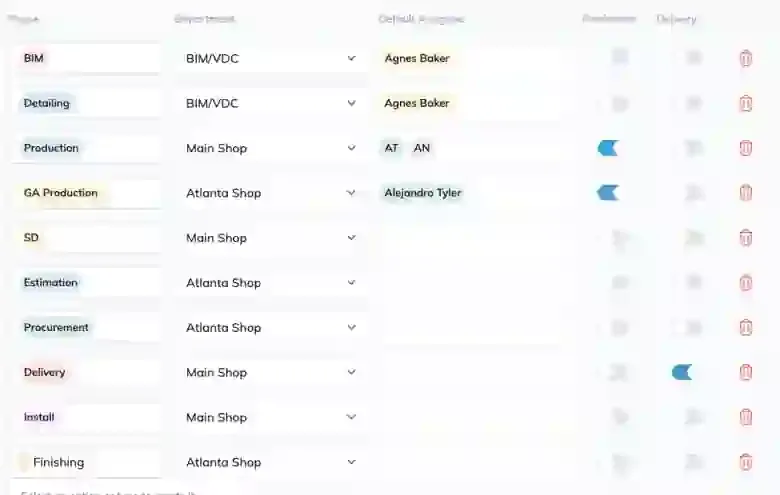
A phase is a chunk of an order. Phase templates are the reusable definitions those chunks are created from, so you set a phase up once and reuse it across every order that needs it.
Each phase template is one of two types:
-
Production. Work that gets built in the shop.
-
Delivery. Work that represents getting something to site.
Why the type matters
Only phases marked as Delivery can be added to a delivery. If you're building a delivery and the work you expected isn't in the list to add, this is the first thing to check.
Step-by-Step Guide
Add a Phase Template
-
From the left-hand menu, go to Rules Engine → Phases.
-
Click New Phase.
-
Enter the phase name.
-
Set the type to Production or Delivery.
-
Pick the Department the phase belongs to.
-
Optionally set Default Assigned, the people who should be put on this phase automatically whenever it's used.
-
Save.
Edit or Remove
Open a phase template to change its name, type, department, or default assignees. Removing a template stops it being used on new orders. It doesn't reach back into orders already built from it.
Tips
-
Get the type right first. A production phase that should have been a delivery phase is invisible to your delivery planning, and the symptom looks like a missing order rather than a mis-set type.
-
Use Default Assigned for the genuinely fixed cases. If one person always does a phase, put them there. If it varies by day, leave it empty and assign in Build.
-
Name phases the way the shop talks. These names surface on the floor.
FAQ
What's the difference between a phase and a stage?
A phase is a chunk of an order. A stage is a step in the route that work travels through. See Stages and Work Steps.
I changed a phase template. Did my existing orders change?
No. Templates apply when work is created from them.
Why can't I add an order to a delivery?
Almost always because its phase isn't marked as a delivery phase. Check the phase template's type.
Conclusion
Phase templates are small but load-bearing. The type field in particular decides what your delivery planning can even see.
Need help? Hit the chat button or click "Ask" in the app. You can also reach us at support@buildingswell.com.
Was this helpful?
Still need help? Ask the team