Cycle Time, Duration, and Float
How route times work: the work content, the calendar time the shift adds, and the gap between them.
Last updated About 1 month ago
Introduction
Building Swell tracks route times in three numbers. They're related but they answer different questions, and mixing them up is the usual cause of "why does this say two days when it's four hours of work?"
-
Cycle Time. The work itself, in hours. It's shift-agnostic. If a step takes four hours of labour, its cycle time is four hours no matter who works when.
-
Duration. That cycle time wrapped into the shift the work runs on, shown in weeks, days, hours, and minutes. Four hours of work on an eight-hour shift is half a day of Duration. On a four-hour shift it's a full day.
-
Float. Duration minus Cycle Time. The calendar time the shift adds. It isn't slack you can spend, it's the gap between work content and elapsed time.
Cycle Time is what you estimate. Duration is what the calendar does with it. Float is the difference.
Where the Shift Comes From
Duration follows the department's default shift, set per department under Departments. See the Departments guide.
This is why the same route can show different Durations in different departments. Same work, different shift, different calendar time.
Changing a Shift Recalculates Routes
This is the part worth knowing before you touch a shift.
-
Change a department's default shift, or edit the hours of the shift it's already on, and Building Swell recalculates Duration on every Department Route using it.
-
You'll be asked to confirm before a default-shift change goes through.
-
On a large set of routes the recalculation takes a little time to work through, so it isn't instant.
Orders are never touched
Recalculation only reaches Department Routes. Work already planned or in flight keeps its times. Changing a shift will not silently move your schedule.
Wait and Cure Steps Are the Exception
Some steps are pure waiting. Curing, drying, settling. There's no labour, so scaling them to a shift would be wrong. Concrete doesn't stop curing at 5pm.
A step is treated as a wait step when its People count is 0 and it has nothing nested inside it. Set People to 0 to make one.
Wait steps behave differently in three ways:
-
Duration tracks raw Cycle Time one-to-one on the calendar, weekends included.
-
Float is the raw difference, not a shift conversion. A 24-hour cure on a 24-hour cycle time shows 0 float, not a negative number.
-
They're badged Wait with their own colour so you can spot them at a glance.
A route where every step is a wait step is pure elapsed time, so its route-level float is raw too.
Containers work differently. An order, route, phase, or component always follows its department's shift whatever its people count, because it holds work rather than being work.
Route Totals
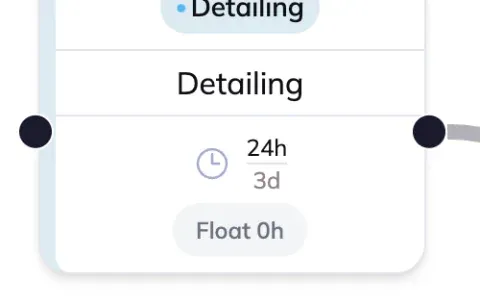
Above the whiteboard you get Total cycle time and Total duration for the whole route. Float is shown per stage rather than as a route total, on a chip on each stage card.

FAQ
I set Cycle Time and Duration changed by itself.
That's correct behaviour. Duration is derived from Cycle Time and the shift. Edit the work content and the calendar time follows.
Why is Duration longer than Cycle Time?
Because a shift doesn't run 24 hours. Eight hours of work on an eight-hour shift is a full day of Duration. The gap is Float.
Float shows 0 on my cure step. Is that broken?
No. Wait steps don't follow the shift, so Duration equals Cycle Time and float is genuinely zero.
I changed a department shift. Did my live orders move?
No. Only Department Routes recalculate. Orders are untouched.
Nothing updated after I changed a shift.
Give it a moment. On a large set of routes the recalculation takes a little time to work through.
Conclusion
Cycle Time is the work. Duration is the calendar. Float is the difference the shift makes. Wait steps opt out of the shift entirely, and changing a shift moves routes but never orders.
Need help? Hit the chat button or click "Ask" in the app. You can also reach us at support@buildingswell.com.
Still need help? Ask the team