Geolocation Events
Review where and how location was captured on deliveries, forms, and QR scans.
Last updated About 2 hours ago
Introduction
Some actions in Building Swell can record where they happened. Confirming a delivery, submitting a form, scanning a QR code. The Geolocation page is the log of those captures.
It's read-only. You come here to check what was recorded, not to change anything.
Not seeing this page? Reach out to your company admin to update your permissions. See the Roles guide.
Step-by-Step Guide
Open the Log
From the left-hand menu, go to Forms → Geolocation.
Read a Row
Each row is one recorded event. The columns are:
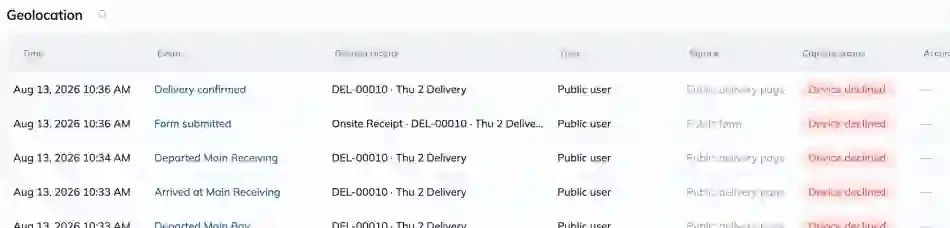
Open an Event
Open a row for the detail: a map of the captured position, the device and browser it came from, and any capture note.
Narrow It Down
Use the date range filter to focus on a window. Working from the time something is disputed is usually the fastest route.
Tips
Read Accuracy before drawing conclusions. A captured point with poor accuracy isn't proof someone was or wasn't somewhere.
"Device declined" is normal. Phones can refuse location. It means the browser said no, not that anyone did anything wrong.
Use Related record to get context. The event on its own rarely tells the whole story.
FAQ
Is location always recorded?
No. The device has to allow it. When it doesn't, the event is still logged with a capture status showing the refusal.
Does this track people continuously?
No. Location is captured at the moment of a specific action, like confirming a delivery. There's no ongoing tracking between events.
Why does an event show no user?
Public pages don't need a login. A driver confirming a delivery from the public page is recorded as anonymous.
Can I delete an event?
No. The log is a record. Talk to us if you have a specific need around retention.
Conclusion
Geolocation events tell you how and where an action was recorded, with enough honesty about accuracy and refusals to stop the log being over-read.
Need help? Hit the chat button or click "Ask" in the app. You can also reach us at support@buildingswell.com.