Incoming Deliveries
Watch what material is due in, and receive it into stock when it arrives.
Last updated 3 days ago
Introduction
This is the inbound side of deliveries: material arriving from a vendor, and getting it into stock when it lands.
Logistics is where deliveries get created and scheduled. Inventory then Deliveries is where you watch what is due in and receive it. Receiving lives here because it is what changes your stock. See Intro to Deliveries.
Not seeing this page? Reach out to your company admin to update your permissions. See the Roles guide.
What the List Shows
Open Inventory and pick Deliveries. Every inbound trip is listed with who it is from and when it is due.
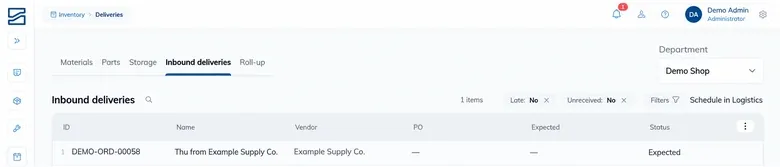
Inbound trips run Expected, then In transit, then Received.
The late marker is the reason to keep this screen open. It is the earliest warning that work planned around material is about to be short.
Receiving a Delivery
Open the delivery, or use Mark received straight from the list.
Go line by line and enter the received quantity. Each line shows the Expected qty and what is still Outstanding, so you can see what you are missing as you go.
Enter what actually arrived. If eighteen of twenty turned up, enter eighteen.
Receive it. Stock goes up and you are told it updated.
Receiving is the step that moves your numbers. It adds to on hand and records what the material cost, which is why it belongs on this screen rather than on the scheduling board.
The quantities you enter feed straight into the figures on Materials and Parts. A short receipt is worth recording honestly, because On order keeps counting whatever has not arrived.
Material That Was Not Expected
Loads do not always match the paperwork. Two things handle that.
Add unexpected material puts a line on the delivery for something that turned up but was not on it.
Create materials for unknown SKUs handles a SKU your catalog has never seen. With it on, a new SKU becomes a draft item rather than an error on the row, so an unfamiliar SKU does not stop you receiving the load.
A new material needs a SKU and a name, and the SKU has to be unique. If it is refused, something in the catalog already uses it.
Draft items are a to-do, not a finished record
A material created this way exists so the receipt can proceed. Go back to the catalog afterwards and give it a category, a base unit and a cost, or you will have stock recorded against an item nobody can plan with.
Receiving at a Location
If you work at one place rather than across the whole yard, the Receiver view on a location shows only the inbound deliveries expected there, and receiving one puts the stock in that location. See Storage and Locations.
Tips
Enter what arrived, not what was ordered. A recorded short is worth more than a tidy number, and it keeps On order honest.
Watch the late marker. It is the cheapest early warning you get that a job is about to be short of material.
Receive at the location where the material physically lands. Receiving from the whole-yard list still works, but stock put in the right place saves somebody hunting for it later.
Tidy up draft items the same day. They are fine for getting a load received and poor for anything else.
FAQ
Can I create or reschedule a delivery here?
No. This screen is for watching what is due and receiving it. Creating, rescheduling and archiving a trip all happen in Logistics.
Only part of the load arrived.
Enter what turned up. The rest stays Outstanding, and it keeps counting towards On order until it arrives.
A SKU on the load is not in our catalog.
Turn on Create materials for unknown SKUs and it becomes a draft item instead of blocking the row. Finish setting that item up afterwards.
Why is a delivery red?
It is past its expected date. The date is marked (late).
Where did the stock go after I received it?
Onto on hand. If you received from a location’s Receiver view it went into that location; otherwise check Storage for where it landed.
Conclusion
Watch this screen for the late markers, receive what actually arrived rather than what was ordered, and clean up any draft items the same day. Scheduling stays in Logistics; this is where material becomes stock.
Need help? Hit the chat button or click "Ask" in the app. You can also reach us at support@buildingswell.com.
Was this helpful?
Still need help? Ask the team